Version 2.21.3
2.21.3 - 21.03.2025
- Fixed issue with displaying equipment documents from the history menu
Version 2.21.2
2.21.2 - 10.03.2025
This release fixes issues reported by our users:
- Documents shared with Handyman Mobile to repair or service orders was not connected to the equipment
- My tasks/Orders - it was not possible to search for Main order value in the list
- Improved time registration where start time is set automatically from last registration to set end time automatically when time is modified
Version 2.21.0
2.21.0 - 24.02.2025
This update introduces some new possibilities and improvements to Handyman Mobile.
- New order list – Setting for alternative use. More details below.
- Fill out the checklist and service forms from history in Service module orders. More details below.
- Hours & Costs license: Users can now add/invite other users to an order from the participant's tab in the order menu.
- Travel log - We now split expenses connected to a trip into parking, ferry, and road toll based on the text in the expenses.
New order list – Setting for alternative use
Background
That is, all tasks on all orders were displayed. In version 2.19 of Handyman Mobile, we introduced a new way of displaying orders and tasks in the same list. In addition, we changed the appearance somewhat and moved the date information at the top and various signaling with icons to the right of the items in the list. The quick menu for each line also gives options to quickly register material and time directly from the list instead of first going into the order menu as before. In addition, stricter rules were introduced for closing orders with multiple tasks from the planner.
After the launch, we received feedback from some of our customers that they do not want to see all the tasks from the planner in the list together with the orders but instead want to see the order list as before, with one item per order.
Based on this, we have added a new option so that users who only want to see one item per order in the list can choose to do so:
• In the list, there is a menu (three dots) at the top right where you can choose various settings for what information should be displayed in the list and how it should be grouped.
Here, a new option has been added: you can choose to see only one item per order, and an explanation of what this means has been added.
When you select "Show only one entry per order," this will change how Handyman Mobile displays the list and the way tasks are handled:
- Only orders are shown in the list, one row per order, as in previous versions
- If there are several tasks for the participant, you can see and change these under "All tasks" inside the individual order, as in previous versions.
- As in previous versions, the dates shown in the order list are from the lowest scheduled start time to the latest scheduled finish time for the participant.
- Personal appointments are not in the list but can be viewed in "Calendar," which is activated from the main menu. Personal appointments can be created and changed here and are visible to those who schedule in Handyman Office.
- As in previous versions, all unfinished tasks will automatically end when you finish the order.
The main menu will show "Orders" instead of "My tasks" with associated signaling and quantity.
We believe these changes will meet the need for flexibility in using Handyman in a way that suits your everyday life.
Fill out the checklist and service forms from history in Service module orders.
Checklist points and service tasks may now have an option to allow copying from history. With one click, you can fill the checklist or service form with values from the previous visit.
First, you'll need to fetch the history for the checklist (Connected to the same equipment in the service module) or service form. (This is done automatically if the service form has points with reference values)
Then, from the page menu, you can fill in the fields that you are allowed to copy from.
Other improvements
In addition, we have also resolved various issues reported by our users to enhance stability and performance.
Version 2.20.3
2.20.3 - 17.01.2025
- Fixed issue where unsynchronized changes to a completed order could be lost if the user activated an free order or picked up an order with a known number from the office.
Version 2.20.2
2.20.2 - 20.12.2024
- Supports change in Handyman Office 9.9.2 which can override the completion of orders from mobile when new tasks have been added to the planner in the office.
Version 2.20.1
2.20.1 - 21.11.2024
This update introduces some new possibilities and improvements to Handyman Mobile.
New option - Do not allow negative stock on mobile
For those of you who don't allow the stock level to be negative, this option will prevent registering material without having it available in the car store.
(Handyman Office version 9.9.2 is required to enable this option)
New option - Serial number required on the material in the price list
Each material in a price list now has a new option that requires entering the serial number when using it on an order.
This also means that quantity must be 1 or -1 when using such material.
(Handyman Office version 9.9.2 is required to enable this option)
New option - Allow editing of already synchronized Hours & Costs registrations
The new option opens for editing already synchronized registrations for a period of time.
- At the end of the week of the entry
- At the end of the month of the entry
Note: This option is unavailable if you use the Hours Approval Module in Handyman Office.
(Handyman Office version 9.9.2 is required to enable this option)
Always show the button for using Quick-lists when adding Hours & Costs
The Quicklist button could have been hidden if the license for multi-entry was active. Now, it is always visible if quick lists exist.
Other improvements
- Fixed sorting of tasks and personal appointments in the service form
- Store items filter added “Article with stock → 0.”
In addition, we have also resolved various issues reported by our users to enhance stability and performance.
Version 2.19.1
2.19.1 - 31.10.2024
The new updated list gives a better overview in Handyman
Handyman has traditionally had two lists of jobs: an order list and a service form.
The order list shows all orders assigned to me that were not planned with the Handyman Resource Planner. The second is a service form, where a task has been assigned to me in the Resource Planner.
Many customers have used both lists at the same time. When there is no need for planning, an order is created, and I am a participant on it for its entire lifetime. Other jobs require more detailed planning, with several visits via the Resource Planner.
The new list combines the order and "My tasks" lists, giving you a better overview of all your planned activities. We have also made registering hours, materials, and checklists quicker. The changes will benefit all mobile users, especially those who use Handyman Resource Planner.
Over the last 3-4 Handyman Office updates, we have introduced important improvements to Handyman Resource Planner to help users work more efficiently. In this release, we are introducing these improvements to mobile users.
For Handyman Resource Planner users, the list is now called "My Tasks" and combines the orders and planned tasks on the orders.
For those who do not use the Resource Planner, the list is still called "Orders." You will see an updated layout of the Orders list with some revised functionality.
Benefits
- Better organized information in the list
- Save time by making faster registrations directly from the list
- It is easy to view and change task status directly from the list
New list – important elements
The new list is rearranged to give a better overview of important information. The date and time for the task are shown on top, and a warning icon is shown if the task is overdue. Other important icons are displayed to the right. The task menu (... dots to the right on each element) has new functions for quicker registrations.
In previous lists, we could have just two buttons. The types of buttons visible depended on the license and settings. To make important functions more accessible, the buttons are replaced by a popup menu button with up to five visible items.
Task menu - quicker registrations
The task menu has been reorganized for quicker access to important functions.
- Quickly add hours, material and edit checklists
- Change task status at the top of the menu
Click here for a more detailed description of the New list and related changes.
Other changes and improvements
- Equipment search in order list now also searches for equipment name
In addition, we have also resolved various issues reported by our users to enhance stability and performance.
Version 2.18.3
2.18.3 - 09.10.2024
- Fixed crash in customer list when large amount of equipment was synced to mobile.
Version 2.18.2
2.18.2 - 07.08.2024
- Fixed rare problems with missing service tasks on completed service orders.
Version 2.18.1
2.18.1 - 26.06.2024
In this release we have corrected a number of reported issues but not introduced any new functions and ways to use Handyman Mobile.
However, what you will notice is these changes:
- When you add images to Handyman Mobile from the image gallery or other sources, they will be compressed according to your setting for image size in the app
-
We have changed the Handyman logo to match our new look. You will see this when the app starts and in the main menu
-
French and Dutch translations have been updated, and the flags in the language selector have been updated
Version 2.17
2.17.0 - 05.03.2024
Planning tasks
- When you close the last planning task on an order from the service form, you will be asked if you want to close the order.
- If you answer no, a new task for the next day will be automatically created.
- You can edit or cancel the new task.
- Closing an order with multiple open tasks is no longer allowed.
- Tasks must be closed before the order can be closed.
- An exception is that the task will be automatically closed if only one task is open when the order is closed.
Travel log
An option to show/hide private trips from the list has been added. If you change a trip to private, it will automatically be hidden in the list if the option is turned off.
Material with Item number 2
- Item number 2 is now visible when adding or editing material registrations.
- In the material picker, long item numbers (both item number and item number 2) are now fully visible.
- You can now search for Item number 2 in the Order material list.
Other changes and improvements
Date changes in resource planning were not reflected in the iOS calendar (fixed iOS 17 calendar permission issue).
In addition, we have also resolved various issues reported by our users to enhance stability and performance.
Version 2.16.2
2.16.2 - 02.02.2024
Fixed reported problems
- Editing checklist info failed when employee number contained a minus sign
- Changing the image on equipment did not update the image in Handyman Office
- The equipment selector should not be visible when adding documents to an offer
Version 2.16.1
2.16.1 - 22.01.2024
Reject mandatory checklist
Checklist can now be set as possible to reject on the mobile. This useful when mandatory checklist for some reason cannot be completed by the mobile user. A reason for the rejection must be entered.
'Sign later' option for user signature
Is is now possible to choose "Sign later" for the user signature. At a later stage, all pending signatures can be signed in one operation. This is useful when several orders are used on the same workplace in a short period.
Assign checklist to another order participant
The main participant on an order can now assign a checklist to another order participant.
When checklist editing is not allowed for all, this makes it possible to delegate a checklist to other participants. Only the main participant on the order has this right.
Other changes and improvements
- Order number is added to the filename for PDF attachment when sending reports from Handyman Office by e-mail
- Email addresses is now filled in sender dialog when sending reports from Handyman Office
- Improved navigation when using the back button in landscape mode
-
It is now possible to move time-registrations to another order when using continuous timers
In addition, we have also fixed various issues reported by our users to improve stability and performance.
Version 2.15
2.15.0 - 06.11.2023
Reference values on service form
Measuring values can now be set as a reference value so that future measurements can be compared with the reference value. It is useful for assessing measurements in a facility over time to assess whether measures should be carried out.
- Service task definition now has an option to be used as a reference value
- This is configured in Handyman Office
- This applies to tasks that require a measuring value or tasks with numerical content
- When filling in measured values, you will see deviations in relation to the reference value
- You will see a graph of historical values together with reference value. The current registration will also be displayed in the graph
- The graph over historical values is visible for all service tasks with measuring values or numerical tasks
- The service report will also show the reference values
|
Service form where tasks with reference values exists. |
|
Edit service tasks immediately gives indication of deviation, and adds possibility to set new reference value. |
|
Graph of historical values show both reference value, historical registrations and current registration. |
Remember the most recently used storage location
A new option per user in Handyman Office 9.8.2 will now control whether the last used store or your default store is used for new material registrations. This is convenient for those who enters several material registrations from other stores than the default store for the user.
Absence registration
Absence registration can now be used with cost elements that is using the new hours type "Other absence" in Handyman Office 9.8.2.
Other changes and improvements
An new setting is available for ignoring notifications from the activity log in Handyman Office.
In addition, we have also fixed various issues reported by our users to improve stability and performance.
Version 2.14.0
2.14.0 - 26.05.2023
Service history reports from server
When server reports on Mobile is enabled in your Handyman solution, all historical Service reports, Order summaries and Checklist reports is sent to mobile as the server version of the reports.
This way all images, signatures is visible for the field user giving much better information on what has been done before.
Get Circuit list document from server
Same situation here. When server reports is enabled on Mobile, the server version of the Circuit list report can be downloaded to the mobile.
Option to hide time info in H&C screen
A new local setting lets you hide the info panel for previous registrations when new Hours & Costs registrations is created.
Show Map on Travel log trip
When looking at a Travel Log trip detail information, a map wit the start and stop positions of the trip is displayed. You can click on the pins to start navigation or to see Street view (iOS and Andrid only).
Show live position of Fleet assets in the map
If you have GSG Handyman Fleet system, and want to see live position of you assets on the Mobile, this is now possible.
Green markers indicate live position of the Fleet asset. The black marker is the registered address for the site.
Activate multiple free orders in one operation
This functionality is available when Handyman Office 9.8.1 is released in June 2023.
Improvements
- Scanning improvements on iOS
- Measuring value is now displayed in service service form
- Customer comment visibility when creating new orders. This field is used in many integrations to indicate if customer is blocked or should not be used to create new orders.
Info icon is clickable in the list of customers:
In the customer details, the info text is now clearly visible: - Main order field is now editable until first sync for new orders
Other changes and improvements
In addition, we have also fixed various issues reported by our users to improve stability and performance.
Version 2.13.5
2.13.5 - 10.03.2023
Important fixes
- Pressing the quick-area on planned material it will now automatically use default values for store, supplier and groupings if it is missing from the registration
Other changes and improvements
In addition, we have also fixed various issues reported by our users to improve stability and performance.
Version 2.13.3
2.13.3 - 20.02.2023
New functionality
- Personal setting to show the main order field (May have different terminology in your Handyman) in the order list
- Search for site/equipment now includes searching in Placed and Serves fields
-
SFTP servers for sending purchase orders to suppliers and getting delivery notes is now supported
- Several suppliers is now changing to SFTP servers
Improvements
- Open reports in full screen (order summary, checklist etc)
- Time input reminder now support holiday type cost element registrations as public holidays and restrictions are applied
-
Improved readability of status info when adding Hours & Costs
- Several improvements in the PDF editor when making comments to PDF documents
- History for service tasks and checklist now will show older values if previous value was not filled
- Single line control for Start/Stop dates in the Order ->General and My Tasks page
-
New Norwegian standards to be included as options in the declaration of conformity
-
NEK 420:2010 and NEK 420A:2016
-
Important fixes
- Groupings from order category are now inherited correctly to quotes
- Improved the sensitivity of scanning barcodes
- Order history for site/equipment is now sorted by finish date
- Full support of “store set as a not visible” rule
- Support decimals for travel distance field
- Data missing in XML for Order Summary/Checklist (improved content in the reports with custom XSLT)
Other changes and improvements
In addition, we have also fixed various issues reported by our users to improve stability and performance.
Versjon 2.12.6
2.12.6 - 17.11.2022
This release fixes issues with QR-code scanning.
Versjon 2.12.2
2.12.2 - 03.10.2022
This release has improvements in the date-picker and support for Contracting Works license.
Version 2.12.1
2.12.1 - 12.09.2022
Major improvements in the way of entering time
Together with many of our users, we have looked at what we can do to become even better at entering time quickly and correctly. This has resulted in a number of improvements and new features in this version:
- New overview of the last weeks entries so that you can easily see if you have entered all that is required
- Fewer clicks to enter time
- Faster way to choose from and to time
- The time for an entire day is entered with one click
- All additional information is in the same screen so that you don't have to go in and out of sub-screens to enter information
- Groups of information can be hidden and displayed with one click
- Groups of information can be hidden and displayed with one click
Get suggestions for entering time based on today's planned time from the Resource planner
- When everything goes according to plan, it is quick to enter the correct time
- It is easy to change or select only parts of the proposal
Copy all registrations from a previous day on an order
- Very practical if you work on projects that last many days
Other changes and improvements
- Handyman support available in the app
- If you have your own login, you can also view your support cases
- If you have your own login, you can also view your support cases
- Separate connection setting for Handyman Cloud
- Time input reminder now takes into account movable holidays and holidays registered in Handyman Office
- Better layout when larger text is used
- When time is entered from the Travel log, the time information will be copied to the registration if this is required on the Cost element
- QR-code/NFC scanning
- Settings: clientname (Multi-client company-name) and userid (employee-number) can now be used so that it is possible to share URL's to specific clients and persons to get quickly started with Handyman
- Enter time registrations by scanning a QuickList
- See more details here
- Option to use an external PDF application. (Under Settings->General)
PDF editing is supported by default in the app, but some advanced PDF forms require the Adobe PDF app to work.
In addition, we have also fixed various issues reported by our users to improve stability and performance.
Versjon 2.11.0
2.11.0 - 25.05.2022
New functionality
- New synchronising progress view. It is now easier to see when you will be done, and what happens during the synchronisation
- Support for new functionality in the Event module
- New type of event: Relative to when the order is scheduled to be finished.
- Allows for automatic notifications when the deadline for completion is approaching
- Add notes to events. Enter additional information related to the event
- Manual events can now be dependent on each other so that you can control the order in which events/tasks can be done
- Events can now be used to mark when an order has been started
- New type of event: Relative to when the order is scheduled to be finished.
-
Travel log: Select several trips in the list and turn them into private trips with one touch.
-
Press the "P" button when the trips are selected
-
- Android: Handyman can now use the Floor Plan Creator app to edit advanced drawings of rooms and their contents to document what is being done in a building
- The Floor Plan Creator app is only avialable on Android
- The Floor Plan Creator app is only avialable on Android
- Registration of material can now be done with QR codes
- See more info on how to create the QR-codes here
Improvements
- New icon for dictionaries
We have also this time fixed various issues reported by our users to get better stability and performance.
version 2.10.5
2.10.5 - 30.03.2022
Improvements
- Rules for hiding prices according to settings in Office are now handled correctly
version 2.10.3
2.10.3 - 25.03.2022
Improvements
- Reports from Handyman Office: Declaration of Conformity is not available. The same applies to all reports on internal orders.
- NFC writing-improvements on iOS.
version 2.10.0
2.10.0 - 08.02.2022
New functionality
- PDF documents are now displayed inside the app, and it is possible to edit and comment in the document.
- Reports from Handyman Office can now be viewed and sent to the customer directly from mobile. New selection in the order menu. (Requires Office 9.6.3).
- Support for writing to NFC chips in the iOS version. "Miface 1k Classic" user is not supported yet.
- When a checklist ends, synchronisation can start immediately. (Requires Office 9.6.2)
- Support for new settings in Handyman Office to hide price from some suppliers. (Requires Office and 9.6.2)
- Support for new settings in Handyman Office to hide storage locations such as no longer in use. (Requires Office 9.6.2)
Improvements
- Image editing now supports multiple line types
- Support for new settings in Handyman Office for optimized synchronisation speed. (Requires Office 9.6.3)
We have also fixed various issues reported by our users to get better stability and performance.
version 2.9.1
2.9.1 - 15.11.2021
New functionality
- Ordering goods from a supplier can now be linked to the department's main store (Requires Office 9.6)
- Quick view can now be used to view all kinds of documents on iOS
- Support for system font size settings (iOS and Android)
- It is now possible to specify a secondary customer when creating an order (Requires Office 9.6)
Improvements
- Registrations with 0 in number can now be deleted after synchronisation.
- New standard NEK 400: 2022 available when filling out Declaration of Conformity
We have also fixed various issues reported by our users to get better stability and performance.
version 2.8.3
2.8.3.0 - 02.09.2021
New functionality
- New calendar view in My tasks
- Personal appointments should no longer be created in the external calendar.
- Repeat appointments will be supported in a later version.
- Choose between list or calendar view by clicking on the tabs.
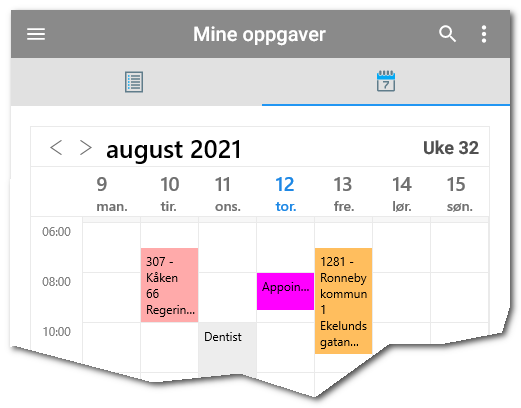
- All order statements and personal appointments are displayed in the new calendar. Absences that are recorded are also displayed.
- You can change your schedule by dragging and dropping tasks in the calendar. New tasks can be added.
- The calendar has several views selected from the side menu: Day, Week, month and timeline.
- You can view all other calendars you have access to on your device in the calendar so that you get a full overview in the app.
- Personal appointments are now created and edited directly in the app.
- The external Handyman calendar is constantly updated so that the phone alerts work as before.
- Commands in QR codes and NFC tags.
- Cost bearers / divisions can be specified in the command for registration of time.
- More information about this can be found here
Improvements
- URL in price list / material is displayed in material info. Click on the link to go to since.
- Create new order: Repair order is the default option if equipment is selected.
- Improvements to Android 11 document management.
- Supports new rules for handling scheduled materials in the Handyman Office 9.5.2
- Supports new options for handling standard checklists by order category and equipment in Handyman Office 9.5.2
We have also fixed various issues reported by our users to get better stability and performance.
version 2.7.3
2.7.3.0 - 14.07.2021
Important fixes
- Fixed a bug that caused the transfer of data to the financial system again
version 2.7.1
2.7.1.0 - 16.06.2021 (2.7.100.21)
New functionality
- Service Module - Some features require Office version 9.5.1
- Completing service tasks now has the same interface as checklists. Instructions and the Previous / Next buttons can be found in the detail screen.
- All data types found in checklists can now be used in service forms (9.5.1).
- Notes can be posted on equipment. Note history is always available when performing service (9.5.1).
- Manual sorting of order on service forms in Handyman Office used when performing service and in the service report. (9.5.1).
- Repair order: The customer's incorrect description is no longer required.
Improvements
- The quote report now shows fixed price quotes correctly.
- Number formatting in reports has been improved.
- Improvements to wholesale services.
We have also fixed various issues reported by our users to get better stability and performance.
version 2.6.2
2.6.2.0 - 06.04.2021 (2.6.100.33)
New functionality
- Scanning QR codes and NFC tags
- Handyman can now be controlled from the outside using commands in QR codes and NFC chips.
- This can be used to search for equipment or orders. In addition, one can set sync address and record hours quickly via QR codes.
- More information is available here
- Automatic scanning of NFC chips without the app being active for iPhone Xs and newer
- Modification of equipment on repair and installation order
- It is now possible to add and remove equipment from such orders.
- When new orders are created, you can also add more equipment to the same order
- Handyman Office version 9.4.3 is required to use this feature
Improvements
- List of equipment
- You can now choose what you want to see in the list in the same way as in the order list. Click the Page menu to configure the content.
- The app remembers your settings for each place the list appears so that you can see what is important depending on where you are in the app.
- Search the order list
- Search for equipment now also finds orders where the equipment is one of several equipment on the order.
- New section to view or search all orders
- Order overview or checklist report is now available from the signature screen when you or the customer signs.
We have also fixed various issues reported by our users to get better stability and performance.
version 2.5.5
2.5.5.0 - 10.02.2021 (2.5.100.17)
Important bugfixes
- Fixed restriction requirements in Hourly Forecast
version 2.5.3
2.5.3.0 - 02.02.2021 (2.5.100.16)
Important fixes
- Better event handling performance
- Correction of visibility of icons for Android 11 users on some phone types
version 2.5.0
2.5.0.0 - 16.12.2020 (2.5.100.8)
Changed functionality
- Search in equipment list - Treats spaces as AND criteria as in other list searches
- It is now not allowed to delete planned material on an order
- Declaration of conformity dialog: No default values are filled in automatically and changed validation rule
Improvements
- Hourly forecast calculation has been improved and is based on a new technical solution
- Increased indentation to submenus in the main menu. Makes it easier to see submenus
- Video and audio documents are handled correctly in view mode
- File sharing with Excel / Word has been improved on all platforms
- Geotagging is preserved when you edit or add photos
- Performance improvements in driving license and material handling
- iPhone: The background color at the top and bottom is now correct on iPhone X and later
We have also made several corrections and improvements in document management, NFC, checklists and more reported by our users for better stability and performance.
version 2.4.3
2.4.3.0 - 21.10.2020 (2.4.100.20)
Bug fixes
- Images on the service form could be overwritten when more images were added on the same service form
- Quick list button was not visible after the previous update
version 2.4.2
2.4.2.0 - 24.09.2020 (2.4.100.17)
New functionality
- Move materials and hours between orders
- Move all non-synchronized or single-entry records. If the registration is already synchronized, a counter-entry is created automatically.
- Faster checklist completion
- The quick area on the left now applies to all types of questions. After filling of answer, the next point is displayed automatically
- New layout in the list shows response type and value for all points
- Instructions appear directly in the detail image for the point
- Updated hourly overview - Sum per wage type is finally shown in the report
- Updated order overview - New selection in settings for summing hours and material on the same item number / wage type
Improvements
- Scanning the barcode in the material list on order will now edit the existing one registration or create a new one automatically.
We have also fixed various issues reported by our users to get better stability and performance.
version 2.3.4
2.3.4.0 - 16.07.2020 (2.3.100.24)
New functionality
- Updated design of date selector makes it faster to enter date and time
- Automatic time calculation also applies to wage types for additional time
- Users' current location is shown on the map
- New image editing capabilities
Improvements
- Speed improvements when adding or editing photos
- The order list is updated faster
- Divisions / cost bearers are now remembered between registrations on the same order
- Directed storage of course listings before synchronisation Fixed issues with partial receipt of orders
- Fixed problems connecting to driving license via 4G with some telecom operators
We have also fixed various issues reported by our users to get better stability and performance.
version 2.2.1
2.2.1.0 - 20.05.2020 (2.2.200.1)
Improvements
- Fixed bug where material could not be registered when there were no storage locations available
version 2.2
2.2.0.0 - 05.05.2020 (2.2.100.2)
New functionality
- Discount in percent can be specified per row for registration of material and hours and costs
- Information about the contents of "closed" item packages can now be displayed (requires Handyman Office 9.4 or later)
- More detailed rights for editing equipment are supported (Requires Handyman Office 9.4 or later)
Improvements
- Improved handling of item prices and local stock updates
- Search for items from groups now supports items at all levels in the group structure
- Course list: Changed entry of Supply Cable from number to number and letters
We have also fixed various issues reported by our users to get better stability and performance.
version 2.1.1
2.1.1.0 - 06.04.2020 (2.1.100.30)
Bug fixes
- Barcode scanning did not work in lists and material searches
- It was not possible to add new items to subdivision lists (Cost bearers) and points)
version 2.1
2.1.0.0 - 17.03.2020 (2.1.100.22)
New functionality
- New app icon layout
- Slightly improved app launch speed
- Support for stock updates based on planned materials. (Handyman Office 9.2.2 or later required)
Bug fixes
- The rate is reset when the wage type is changed when registering hours
- Corrected handling of decimal separators when entering numbers
- Quotations can now be created from the order menu
- Course list has been updated in accordance with the NELFO standard. Cross section allows now text in the form 2x3x240, 3x240 or 4G240
- Corrected display of course list after new course list was added
- Improved error message for connection problems in logbook
- Fixed bug when merging logbook trips
- Search results are reset when the search panel is closed
- Removed the ability to enter in numbers on cost element registration
- Corrected salvage of hours for the current week
- Fixed error saving 0 in number during inventory count
- List of orders is updated after sending the order
- Corrected errors when sending order via email or phone
- Fixed various stops in the app
version 2.0
2.0.0.0 - 17.02.2020 (2.0.100.11)
New functionality
- Added support for the new Handyman Office resource planner. Requires Handyman Office 9.2.1 or higher
- Added user-level rights management to change order category. Requires Handyman Office 9.2.1 or higher
- Support for new URL document type. Requires Handyman Office 9.2.2 or higher
- Added timeout setting "minutes" in the hours & cost time picks
Bug fixes
- Added missing translations
- Corrected the use of decimal separators for prices in the material list
- Fixed texts that were cut in the material list description for UWP
- Changed the accept button in purchase orders to a floating button
- Removed a strange error message when deleting a delivery note failed
- Corrected deletion of files the next time a user retrieves a delivery note from the same FTP server where a previous deletion failed
- Fixed the display of customers by search and added a new customer from Office
- Fixed adjustment of amounts in purchase order list
- Moved the calculate button on the first page when time entry is required on pay code
- Fixed silent crash when updating calendar events
- Minor performance improvement at application startup. Clean-up of temporary staff is not done at startup of the application, but after each synchronisation
- Improved visibility of travel and pause icons in timers
- Show BackOfficeID instead of handymanID for last used order in the Screen "Known order number".
- Fixed incorrect validation in "Absence" screen
- Updates information in the screen header of the date selector when the user changes the value selector
- Fixed grouping deviation to add / remove / replace material
- Fixed the display of incorrect fields for Lonnsart.IdBaksystem, in TMS Time Report
- Fixed the display of the correct screen after completing the order
- Fixed Missing Cost Element Number Display in Hours & amp; cost list for quote
- Fixed the missing update of the TimerEvent table when syncing of a new order created on the mobile
- Fixed "Empty memory" exception when uploading mobile database
- Directed use of external order number Service. (External web service to download order number)
- Fixed the missing characters in the hourly summary report when the cost element numbers contain non-numeric values
- Fixed wrong quantity in Office when material received for a purchase order
- Fixed incorrect price for unit amount in quotation. The price was 0